
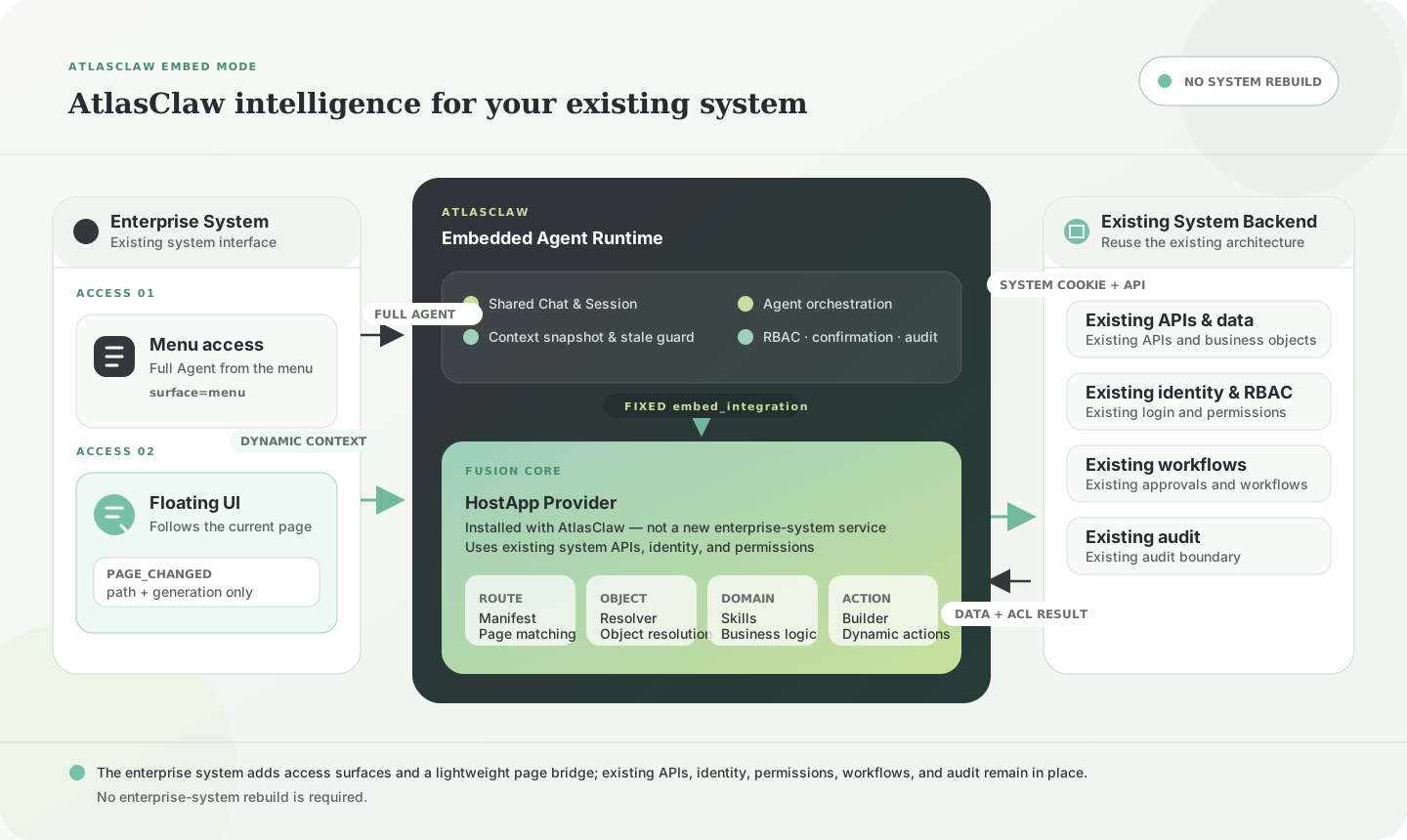
Fusion core
AtlasClaw understands and acts within your existing system.
Configured through embed_integration, the HostApp Provider maps pages to business objects, Domain Skills, and state-aware actions. AtlasClaw can then respond to the current Context and act through existing APIs, identity, permissions, workflows, and audit—without adding a new service or rebuilding the backend.
Two access modes
One AtlasClaw Agent, available through two access points.
Independent menu access and the floating interface are two ways to reach the same AtlasClaw Agent. An enterprise system can use either one or both without duplicating the AtlasClaw integration.
SmartCMP reference
AtlasClaw understands the current page, its business object, and available actions.
SmartCMP keeps its existing architecture. Its AtlasClaw Provider matches supported routes, resolves the visible object through existing APIs, and reuses Domain Skill action builders for floating Context and normal Chat. The routes below are representative examples from the broader v1.0.0 coverage.
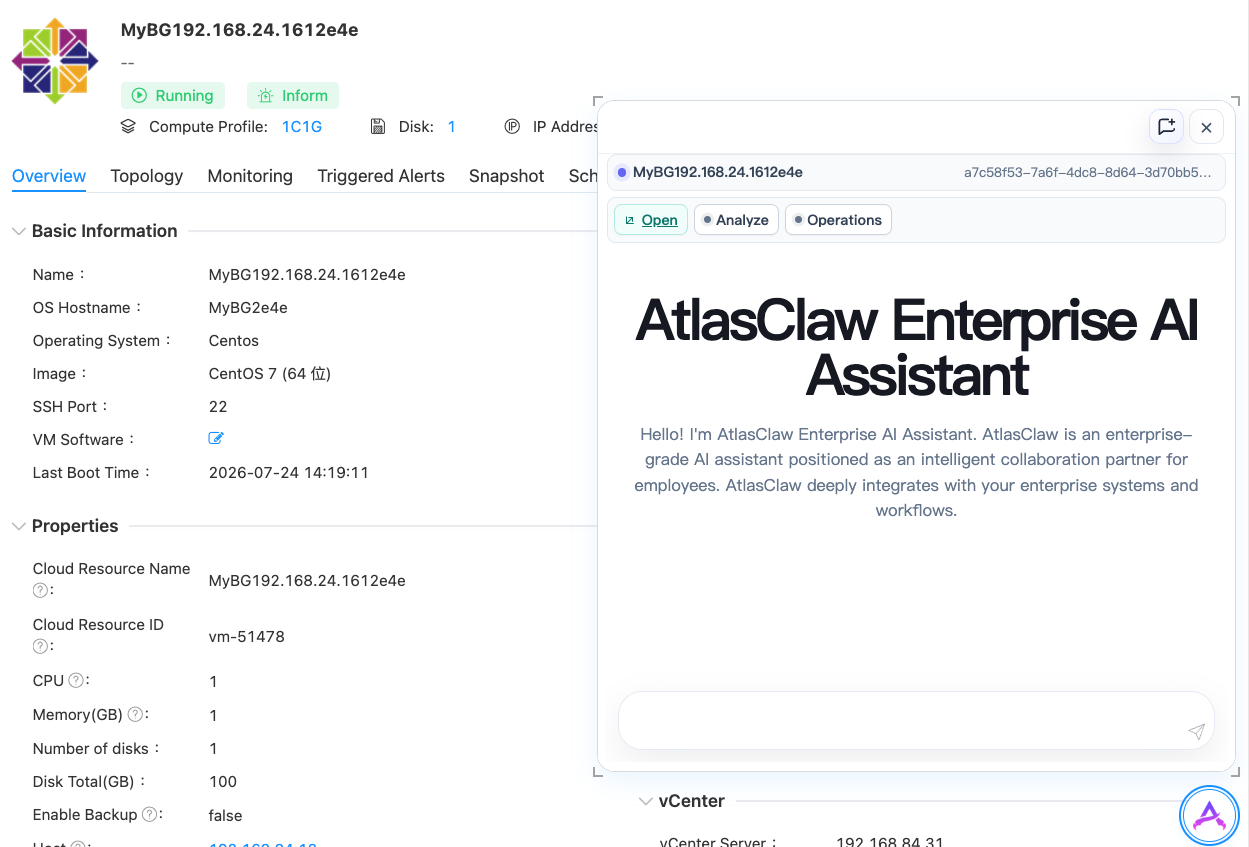
A VM detail route resolves to virtual_machine and smartcmp:resource. The resource Domain Skill exposes Open, Analyze, and Operations without requiring SmartCMP to send a resource DTO.
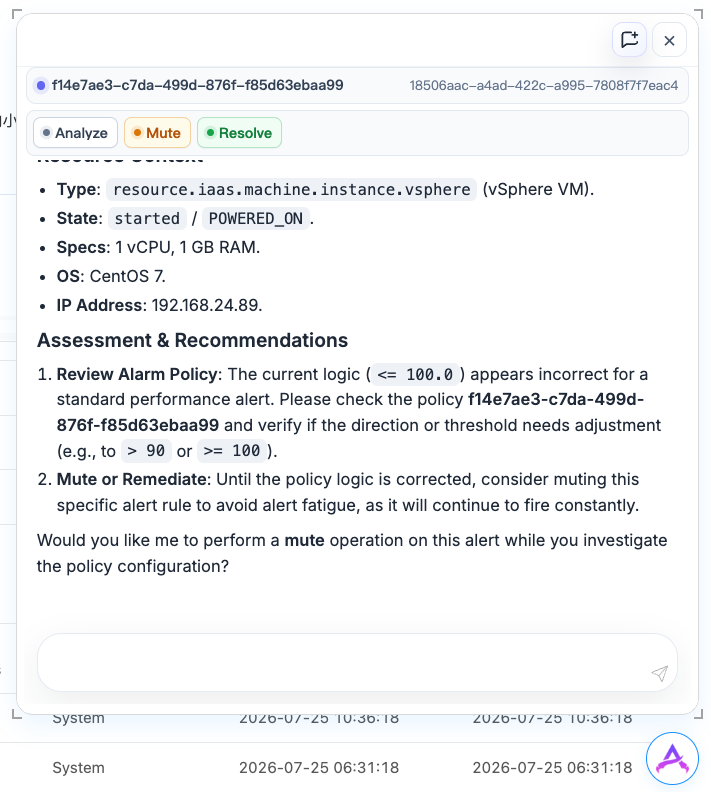
An alert detail route resolves to alarm_alert and smartcmp:alarm. The alarm Domain Skill offers Analyze plus status-valid Mute, Resolve, or Reopen actions.
/main/virtual-machines/{resource_id}/details - OBJECT
- virtual_machine
- SKILL
- smartcmp:resource
Open · Analyze · Operations
/main/alarm-activity-management/alarm-triggered/edit/{alert_id} - OBJECT
- alarm_alert
- SKILL
- smartcmp:alarm
Analyze · Mute · Resolve · Reopen
/main/work-order-request/{catalog_id} - OBJECT
- catalog
- SKILL
- smartcmp:request
Build request · Validate live choices
/main/work-order-process/ServiceRequest/myApproval/{generic_request_id} - OBJECT
- approval_request
- SKILL
- smartcmp:approval
Analyze · Approve · Reject with reason
/main/resource-management/policy/edit/{policy_id} - OBJECT
- security_policy
- SKILL
- smartcmp:security-compliance
Read-only policy Context
/main/service-model/forms/edit/{form_id} - OBJECT
- form_definition
- SKILL
- smartcmp:form-designer
Generate complete replacement · Review and copy
Dynamic Context
From a page change to a governed action.
The enterprise system publishes navigation state. AtlasClaw and its configured HostApp Provider own the meaning, data resolution, and execution path.
- 01 Enterprise System
Publish the page
Send the normalized router path with a monotonically increasing generation.
- 02 Core
Resolve only the latest page
Debounce rapid navigation, expose loading, use the fixed HostApp Provider, and reject stale generations.
- 03 HostApp Provider
Resolve meaning and actions
Read the object through existing system APIs and reuse its Domain Skill action builder.
- 04 AtlasClaw Agent
Reason and execute
Bind action-only follow-ups to the current object while retaining ordinary Skill routing, RBAC, confirmation, and audit boundaries.
Enterprise system integration
Add a light integration without rebuilding your enterprise system.
Your enterprise system only adds access points and page lifecycle events. AtlasClaw and its configured Provider supply the intelligence while the existing architecture remains in place.
For both surfaces
- Embed AtlasClaw in the enterprise system's signed-in browser session.
- Share the enterprise system Cookie so Provider calls use the same user identity and upstream permissions.
- Keep AtlasClaw session keys, Provider configuration, and business DTOs out of cross-window messages.
Independent menu access
- Add an independent AtlasClaw entry in the enterprise system navigation.
- Load the full AtlasClaw interface through that menu route.
- No page event protocol is required.
Floating additionally
- Manage launcher, iframe, ready, and close lifecycle.
- Provide exact host origin and a per-frame nonce.
- Send validated page changes with strict message type, nonce, and generation.
Start integrating
Read Embedded integration Bring AtlasClaw into your enterprise application
Start with the Embedded integration contract, then add Provider Context routes for the pages where users need analysis and action.